IPTV on a MAG box: set up the portal
There is nothing to download on a MAG box. Its built-in portal does the work once we have linked the box to your plan, so the whole setup is one message and one address.
Short answer
Forget usernames: a MAG box signs in with its MAC address and a portal URL. Read the MAC from System Settings or the sticker underneath, message it to us on WhatsApp, then type the portal URL we reply with under Servers, Portals. Save and restart; the whole job takes roughly 5 minutes.
- Works on
- MAG set-top boxes
- Setup time
- About 5 minutes
- Difficulty
- Easy
- Method
- The portal built into the box
- You need
- The box's MAC address and WhatsApp on a phone
No login yet? Compare the plans first. Unsure your connection copes with 4K? Run the IPTV speed test on the same network.
Set up the portal step by step
There is one method on a MAG box, and we do the activation. You read out the MAC address, we send back the portal URL.
Built-in portal Free, we activate it
You share the MAC address; we link the box and send the portal URL. Built into the firmware; nothing to pay for an app
-
Connect the box and power it on
No username or password is involved here: the box identifies itself by MAC address and loads a portal URL. Connect it to the TV and your router, then power it up.

-
Read the MAC address
Go to Settings, then System Settings, and find the MAC address. A sticker beneath the box carries it too. It looks like 00:1A:79:xx:xx:xx.

-
Send the MAC to us on WhatsApp
Send us the address in a WhatsApp chat. A photo of the sticker works just as well. Check each character before you press send.

-
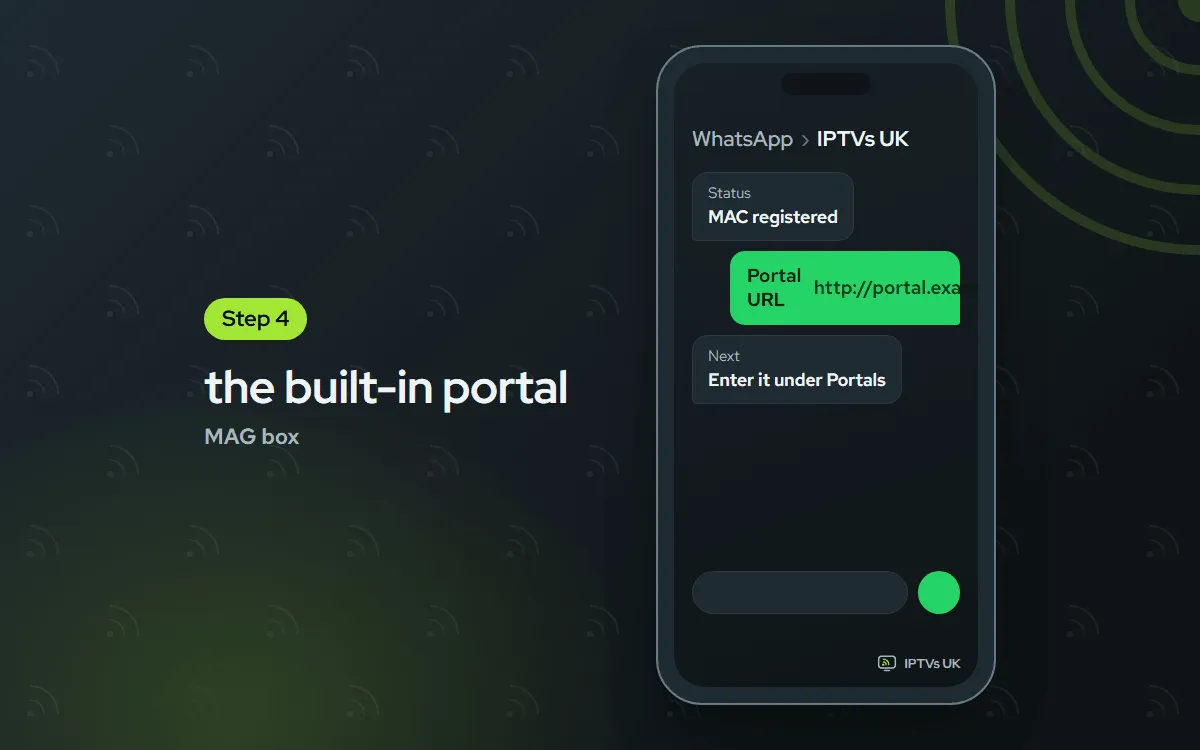
Get your portal URL back
Once the box is registered, we reply with your portal URL. Expect something like http://portal.example.com/c.
-
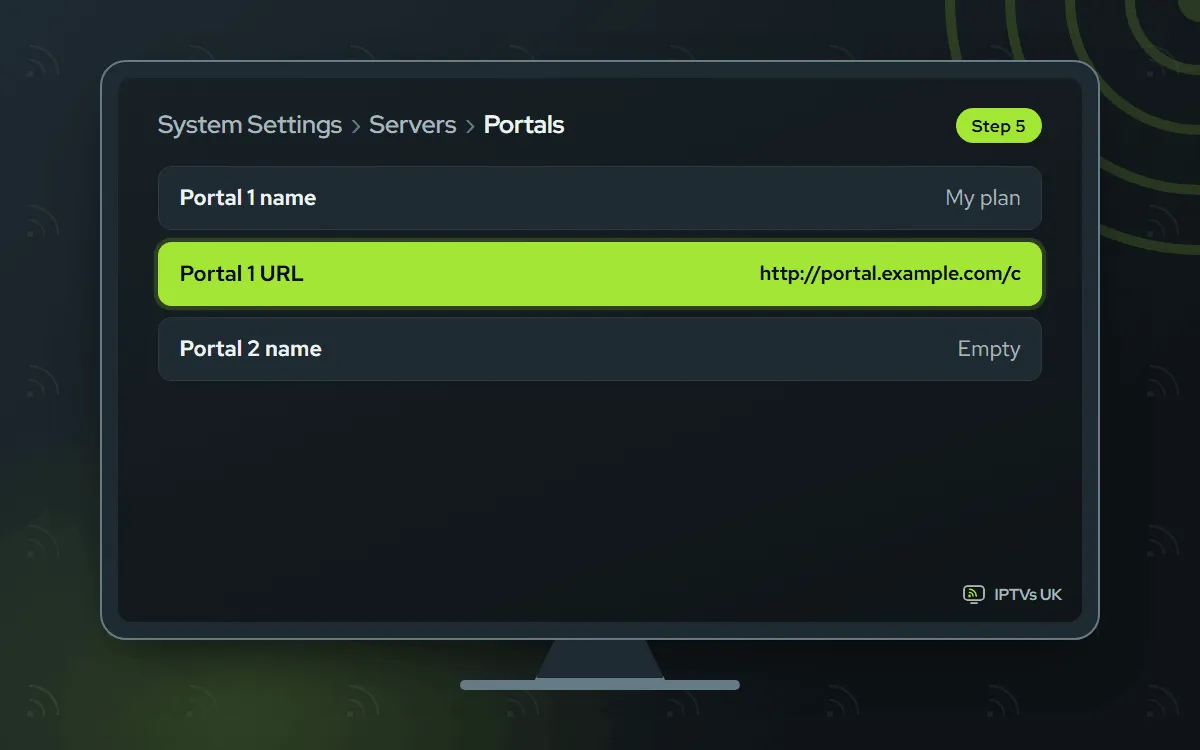
Type in the portal
Go into System Settings and choose Servers, followed by Portals. Name the portal whatever you like, then copy our URL character for character.
-
Save and reboot
Press OK to save it. Step back a screen and pick Reboot. When the box starts up, the portal opens with your channels and TV guide.

Before you start
Have these sorted and the setup takes one sitting.
- The box plugged in. Connected to the TV and the router and switched on. An Ethernet cable is the best link.
- A steady line. 4K needs 25 Mbps or more.
- An active plan. Your portal URL comes on WhatsApp once we have the MAC. No plan yet? Compare the plans; each one works on a MAG box.
- About 10 minutes and the remote to hand.
This is needed a single time; afterwards, switching the box on is all it takes.
How a MAG box connects
Most players ask for a username and password. A MAG box does not. Every unit carries a permanent hardware address, the MAC, and our server recognises your box by it. The portal URL simply tells the box where to look. That is why everything starts with you sending us the MAC.
On MAG boxes the address opens with 00:1A:79, followed by three more pairs. It is printed on the sticker underneath and repeated in System Settings, so the sofa is close enough. After we register it, each start-up opens the portal with live TV, the guide and the on-demand menus. Nothing else needs installing.
Which method should you pick?
There is only one, the portal already inside the box. Because the firmware contains it, you download nothing and pay no app fee. A MAG box cannot take other player apps. Want a choice of players? A Formuler box runs a portal as well as full apps, as our Formuler guide shows.
MAG box troubleshooting
Find the message or symptom you see below.
"STB is blocked"
This means we have not linked the box to your plan so far. Check the MAC you sent against the sticker, character by character. Wait for our WhatsApp confirmation, then restart the box using its menu or power button. The warning clears as soon as the link is live.
"Portal not found"
A typo in the URL is the usual cause. Reopen Servers, Portals and check the address against our message: http:// at the start, /c at the end. Delete any trailing space, then save and restart. Still showing? The box may have lost its connection, so try the built-in network test.
You sent the wrong MAC address
Easily done, usually by copying the address from another device by mistake. Send us the right one from the sticker or System Settings. We switch the link over on our side; you restart the box and change nothing else.
Channels play but the guide is blank
The guide data takes a few minutes to arrive after a new activation. Keep the box running, restart it one time, and if the grid is still bare an hour later, message us on WhatsApp. Other causes of an empty grid are covered in our EPG troubleshooting post.
The picture freezes
These boxes are built around a wired link. Wire it with Ethernet where possible; otherwise bring it nearer your router. Over Wi-Fi, choose a channel in FHD or HD instead of 4K. Consistency beats raw speed for smooth playback.
The box restarts on its own
Random reboots usually mean too little power or too much heat. Plug in the adapter that came with the box, give it room to breathe and do not tuck it against the warm back of the TV. Still rebooting? Install any firmware update offered in the settings and restart.
The remote stops responding
Fit fresh batteries and aim at the box, not the TV. If just a few buttons fail, press Menu to exit the portal and go back in. Pulling the plug for sixty seconds clears the interface and normally wakes the remote up.
Time zone and guide offset
Programmes starting at the wrong time nearly always point to the time zone. In System Settings, open the time zone setting, pick your own city and reboot. If the schedule is still off, open the portal settings and nudge the guide offset an hour forward or back until the grid matches what is on air. The clocks changing in spring and autumn can move it again, so check the offset then. The box remembers the setting.
Moving to a new box
Every replacement box has a different MAC, so we have to link the new one to your plan. Message us its address and we transfer your plan to it. From then on the old box no longer opens the portal, and you have nothing to cancel. A firmware update usually keeps the portal list, but a factory reset wipes it, so note the portal URL first.
Settings worth checking
The defaults suit most homes. A few small changes help the picture stay smooth and the guide stay on time.
- Connect by Ethernet whenever you can.
- Match the video output to the TV (1080p or 4K, say).
- Install firmware updates from the settings menu.
- Choose your time zone before judging the guide.
- Reboot the box once a month.
Adding a second screen? The Fire TV Stick guide and the Android TV guide cover the most common next devices, and every plan can cover 1, 2 or 3 of them.
Ask us
Send a photo of the screen to us on WhatsApp, or email support@mediaprovider.online. We give Daily support, usually within the hour.
